v2.7 (latest)
Use a Ruleset from Your Software
Introduction
In this tutorial, you'll call the LoanApplication ruleset you built earlier via its API and integrate the result into a web page. This is one of the most powerful things you can do with Rulecube — embedding your business logic directly into your applications.
After finishing this tutorial, you'll know how to integrate a ruleset into a web page.
Use a ruleset from external software
This tutorial assumes you're familiar with JavaScript, so feel free to develop your web page solution to integrate the loan application ruleset from the previous tutorial. Or follow along with this tutorial. Either way, we encourage you to add your personal insights to explore the integration possibilities of Rulecube.
Task: Look up the JavaScript example of a ruleset
Rulecube makes your development life as easy as possible and automatically provides a JavaScript example of how to call and consume the API of each ruleset.
Open the
LoanApplicationruleset and click Docs.
↳ The Documentation page opens with the Summary tab activated.Explore the Summary tab, which gives a quick overview of a ruleset.
Click the Examples tab.
↳ Rulecube shows afetchexample for calling the ruleset via its API: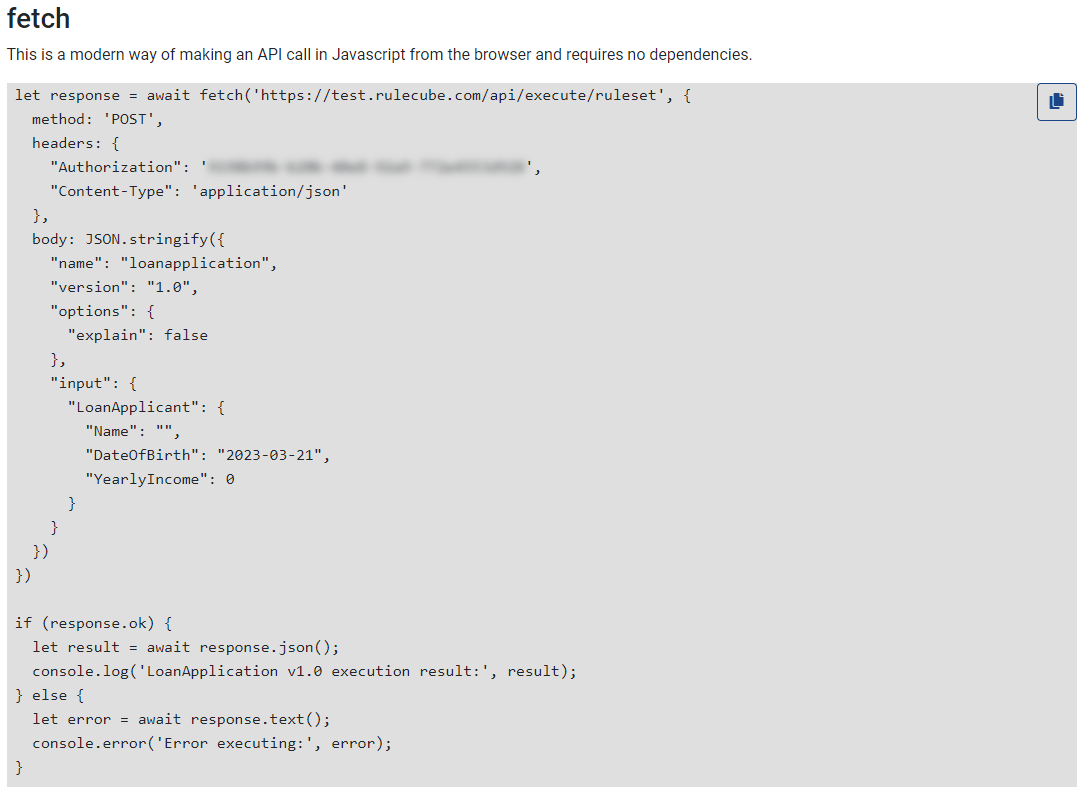
Task: build a web page that calls and consumes the ruleset
For simplicity, the following HTML file contains both HTML definitions and the corresponding JavaScript code. In real-world applications, you would probably separate the HTML and JavaScript into different files.
Create a new HTML file in your favorite code editor named
CallLoanApplication.html.Enter the following code into the file:
html<html> <head> <link rel="stylesheet" href="https://cdn.jsdelivr.net/npm/bootstrap@4.6.2/dist/css/bootstrap.min.css"> <script src="https://cdn.jsdelivr.net/npm/jquery@3.6.3/dist/jquery.slim.min.js"></script> <script src="https://cdn.jsdelivr.net/npm/popper.js@1.16.1/dist/umd/popper.min.js"></script> <script src="https://cdn.jsdelivr.net/npm/bootstrap@4.6.2/dist/js/bootstrap.bundle.min.js"></script> </head> <body> <div class="container"> <h1 class="m-5">Loan Amount Calculator</h1> <div class="m-5"> <form action="javascript:calculateAmount()"> <div class="row"> <div class="form-group col-6"> <label for="applicantname">Applicant name:</label> <input type="text" class="form-control" id="applicantname"> </div> </div> <div class="row"> <div class="form-group col-3"> <label for="dateofbirth">Date of birth:</label> <input type="date" class="form-control" id="dateofbirth"> </div> </div> <div class="row"> <div class="form-group col-3"> <label for="yearlyincome">Yearly income:</label> <input type="number" class="form-control" id="yearlyincome"> </div> </div> <button type="submit" class="btn btn-primary">Calculate loan amount</button> </form> <div class="jumbotron"> <h4 class="ml-2 mb-3" id="overviewtitle">Overview</h4> <div class="col-3"> <label for="age">Age:</label> <input type="number" class="form-control" id="age" readonly> </div> <div class="col-3"> <label for="maxamount">Maximum loan amount:</label> <input type="number" class="form-control" id="maxamount" readonly> </div> </div> </div> </div> <script> async function calculateAmount() { let response = await fetch('YOUR_RULECUBE_URL/api/execute/ruleset', { method: 'POST', headers: { "Authorization": 'YOUR_API_KEY', "Content-Type": 'application/json' }, body: JSON.stringify({ "name": "loanapplication", "version": "1.0", "options": { "explain": false }, "input": { "LoanApplicant": { "Name": document.getElementById("applicantname").value, "DateOfBirth": document.getElementById("dateofbirth").value, "YearlyIncome": document.getElementById("yearlyincome").value } } }) }) if (response.ok) { let result = await response.json(); console.log('Result:', result); document.getElementById("overviewtitle").innerHTML = 'Overview for ' + document.getElementById("applicantname").value; document.getElementById("age").setAttribute('value', result.result.LoanApplicant.Age); document.getElementById("maxamount").setAttribute('value', result.result.LoanApplicant.MaximumLoanAmount); } else { let error = await response.text(); console.error('Error executing:', error); } } </script> </body> </html>Replace
YOUR_RULECUBE_URLon line 51 with the base URL of your Rulecube instance. E.g. https://app.rulecube.comReplace
YOUR_API_KEYwith your key on line 54.
Explanation
The code uses the Bootstrap framework to create a form for entering the ruleset input with an action for calling the ruleset and displaying the calculated output.Save the HTML file and open it in your browser.
↳ Your web page should look like this: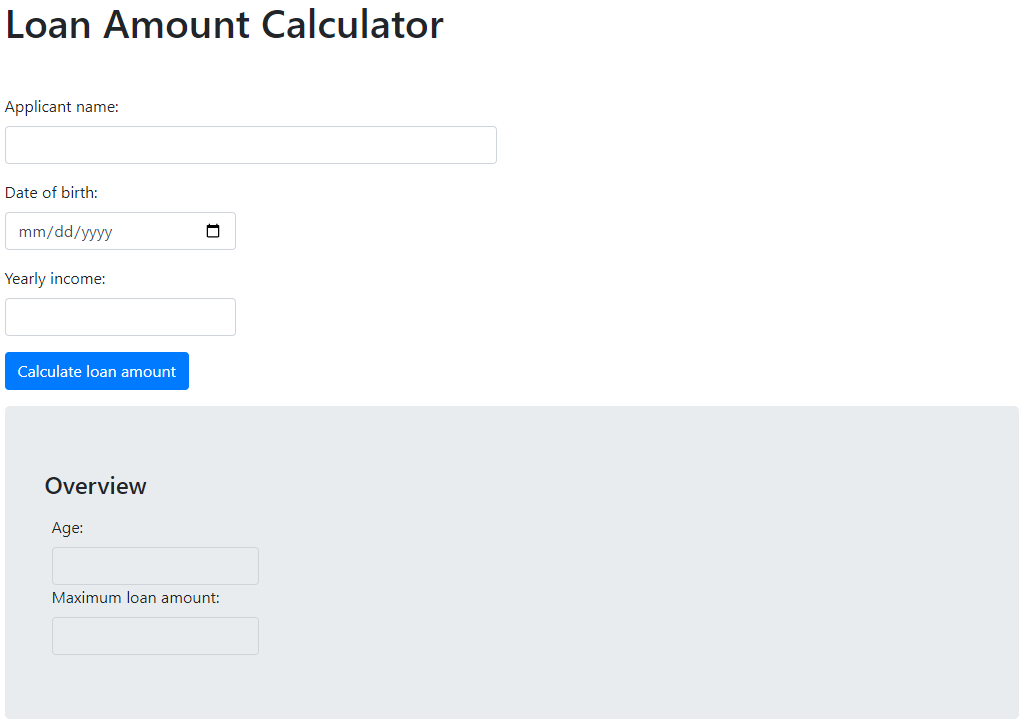
Enter input values into the calculator and click Calculate loan amount.
↳ The JavaScript code calls the ruleset through its API and parses the output into the web page.
Recap
You have integrated your ruleset into a web page.
What's next?
You've connected your ruleset to the outside world using JavaScript. You now know how to call a ruleset via its API and integrate the result into your own application.
In the next tutorial, you'll learn how to model multi-step processes with human decision points using Workflows.