v2.7 (latest)
Create a Dialog
This guide explains how to add a dialog element to a Rulecube Form.
A dialog renders a modal that appears when a bound property is true.
Prerequisites:
- Add an Entity
Restaurantwith inputsfoodanddrinkof typestring. See Entities for instructions. - Create a Subform using the input properties from the Entity Restaurant. See Create a Subform for instructions.
Steps:
- Go to the tab Global variables
- Click +Add Variable and add
showDialogas Name - Go to the tab Definition
- Click +Element and add an element of type Button with:
- Label:
Show dialog - On click actions: select
Set global variable, Path:showDialog, Value:true
- Label:
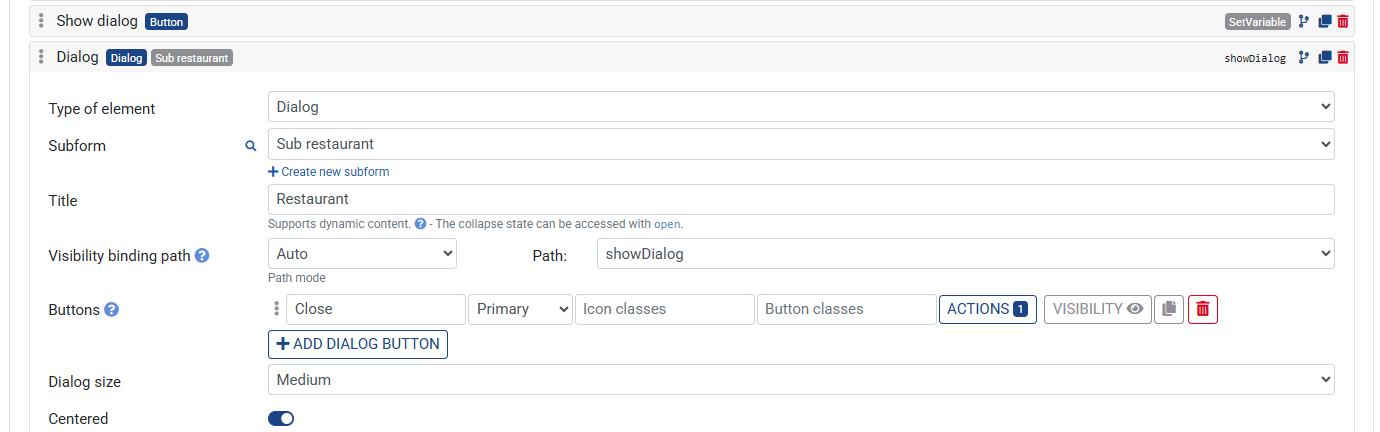
- Click + Element and choose Dialog
- Expand the element
- Set the Title to
Restaurant - Assign a Subform to render inside the dialog
- Under Property binding, set the Path to
showDialog - Click +Add Dialog button, add Button text
Close - Save the Ruleset