v2.6
Workflow webhook
Workflow webhook definition
A workflow webhook works as follows:
Create an Upload step of type "webhook"
- In the upload step, define a state property, e.g.,
paymentResult, to receive the callback information. This property should be of type "WebhookRequest", so the callback information is available in subsequent steps.
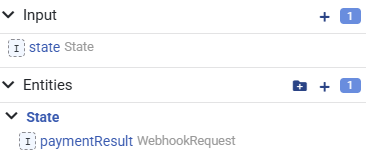
- In the upload step, define a state property, e.g.,
Before the Upload step, create an Action. In this Action, a webhook URL needs to be created to send to the third party. This is done with
Workflow.createNextWebhookUrl()\js// Assuming the next step is an Upload step of type 'Webhook' let webhookUrl = Workflow.createNextWebhookUrl() // Use an imaginary payment provider to create a payment and set the webhook URL: // This payment provider will call the webhook URL when the payment is completed Http.post('https://payment-provider.com/create-payment', { amount: 100, currency: 'EUR', webhookUrl: webhookUrl })
The webhook URL is something like
http
https://{API_URL}/workflow/webhook?token={TOKEN}- After the Upload step, create another Action. In this Action, the configured state property (
paymentResultin our example) will be filled with the HTTP request information received from the third party in the previous step.
As a result, the workflow will look something like this:
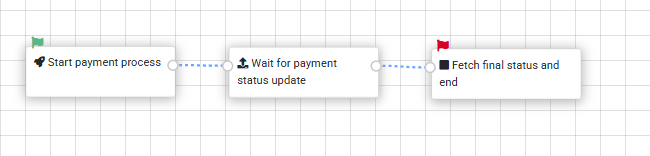
Typically, these steps are part of a larger workflow.
The WebhookRequest type has the following structure:
{
    "data": /* Request body parsed to JSON or raw body string */,
    "query": {
        "param1": "12345",
        "param2": "abcdef"
    },
    "headers": {
        "Accept": "text/html",
        "Connection": "keep-alive",
        "Host": "yourdomain.com",
        "User-Agent": "Chrome/141.0.0.0 Safari/537.36",
        "Accept-Encoding": "gzip, deflate, br, zstd"
    }
}