v2.6
Using Global Variables
Introduction
Global variables are form-level constants that are injected into the form model when the form loads. They let you define fixed values once and reference them anywhere in the form — in property bindings, conditional visibility, and default values — without hardcoding the same value in multiple places.
Where to define them
- Open your form in the editor
- Go to the Global variables tab
- Click + Add variable
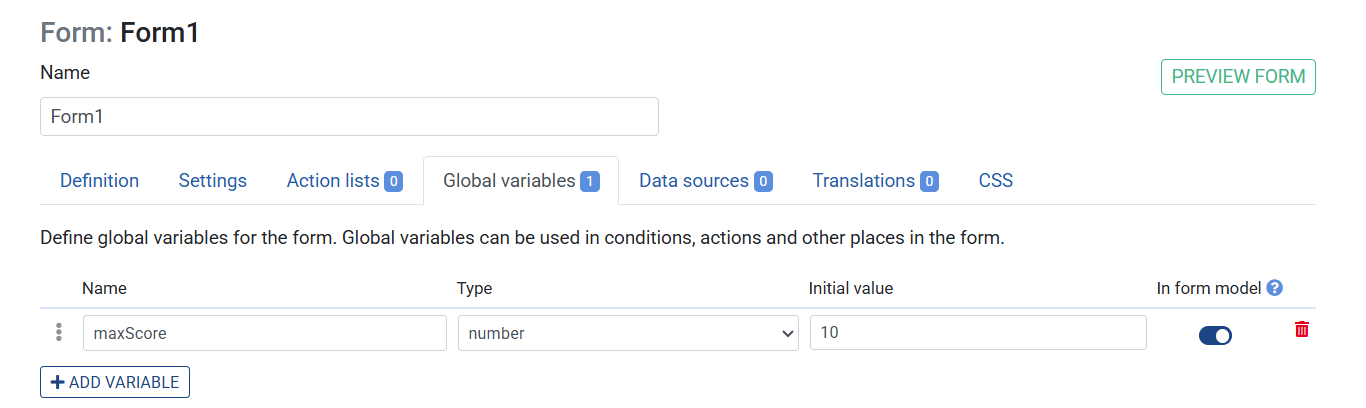
- Fill in:
- Name — the identifier you will use in bindings (e.g.
maxScore) - Type — one of:
String,Number,Boolean,JSON - Value — the value, coerced to the selected type
- Visible in form model — whether the variable appears as a readable field in the form model
- Name — the identifier you will use in bindings (e.g.
Supported value types
| Type | Example value |
|---|---|
| String | "Hello world" |
| Number | 100 |
| Boolean | true |
| JSON | { "threshold": 80, "label": "Pass" } |
JavaScript literal objects are also accepted as values.
Using a global variable in a binding
Global variables are available as paths in all property bindings — the same way ruleset fields are. For example:
- An Output element's Path can be set to
maxScoreto display the variable's value - A conditional visibility rule can compare a field against
maxScore - A Hidden input's default value can reference
maxScore
Example — configuring a pass/fail threshold
You want a form to highlight a score as passing when it exceeds a threshold, but you want the threshold to be easy to change without editing every element.
- Create a new Ruleset
- Create an input named
scoreof typenumber - Create a new Form
- Go to the Global variables tab
- Add a global variable: Name
passThreshold, TypeNumber, Value60 - Go to the Definition tab
- Add an Input element with : Label
Score,TypeNumber - Add an Alert element with Label
Score is passingand with Visibilityconditional visibility:- Condition:
score>=passThreshold
- Condition:
- Save the Ruleset
Previewing the Form
- Click the Preview button in the top right corner

To change the threshold later, update the global variable — no other changes needed
Tips
- Global variables are read-only at runtime — they cannot be changed by actions or rulesets during form execution
- If you need a value that changes at runtime, use a Hidden input with a default value instead
- JSON-type variables are useful for passing structured configuration (e.g. a list of allowed values or a settings object) into the form model
- Variables set to not visible in the form model are still usable in bindings, but will not appear in debugging/inspection tools