v2.6
Debugging your Ruleset
You may find yourself in a situation where you need to debug some complex logic in your code.
When you're familiar with programming in JavaScript, you'll no doubt know about console.log.
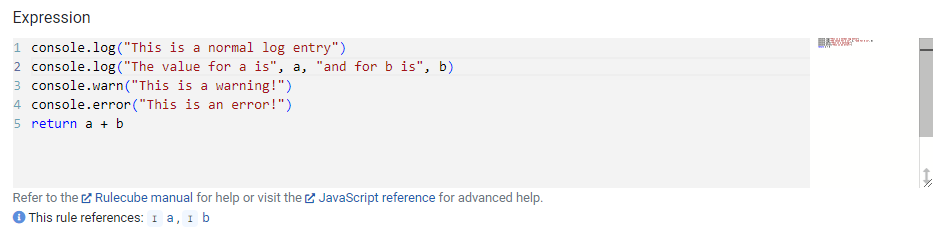
Rulecube offers a similar API! You can use console.log(), console.warn() and console.error() anywhere in your Ruleset code.
Example
Sandbox
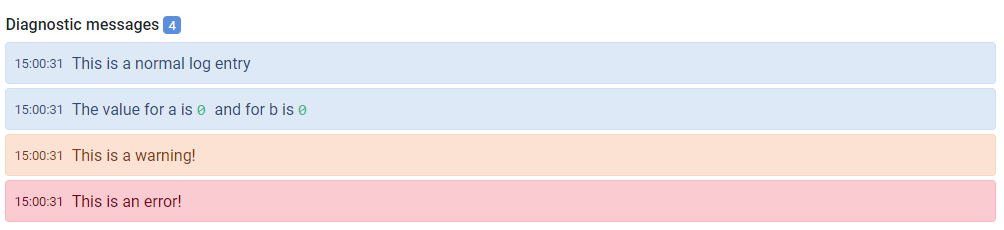
The Sandbox offers a visualization of your Console logging below the actual result after executing.
What happens to my logs?
Your logs are returned in the execution result of the API. They are not stored on any server. The amount of log lines is also capped at a certain limit. The default is a maximum of 100 lines. This means only the last 100 lines are returned.
API call
By default, no logging is returned in the ruleset execution result. This can be changed by setting the execution options.logLevel to 'info', 'warning' or 'error'. See a Ruleset's Swagger UI page for more info (at the bottom of its Version settings).
- 'info' - every log will be returned
- 'warning' - only warnings and errors (console.warn() and console.error())
- 'error' - only errors (console.error())
The API result from an execute will contain your logging in the diagnostics property. This is an array with the following object structure:
| Field | Type | Description |
|---|---|---|
| t | number | Timestamp represented as number of milliseconds after 1970-01-01 |
| type | string | "log", "warn" or "error" |
| arguments | any[] | An array of the parameters you passed to console.log() / .warn() or .error() |