v2.6
Create an Entity
Procedure
Let's create a compound entity because if you master that, you'll also know how to create elementary entities. You'll create the compound Invoice entity as shown above, including the calculation of Amount at the InvoiceItem level and the TotalAmount at the Invoice level.
For compound entities, it's necessary to work bottom-up because parent entities require child entities to be available. So, first, create ProductItem, then InvoiceItem, and finally, Invoice:
Step 1: Create the ProductItem entity
Create a ruleset named
TotalInvoiceAmount.Create an entity named
entProductItem.Click Add property.
↳ The Input/Property page opens.In The Name field, enter
ProductID. And in the Type list, selectstring.Save the property.
Repeat steps 3 to 5 to create the
Descriptionproperty as astringand thePriceproperty as anumber.
↳ Finally, your entity should look like this: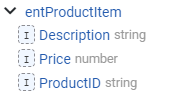
Step 2: Create the InvoiceItem entity
Create an entity named
entInvoiceItem.Add a property named
Count(Type=number).Add a property named Product. And in the Type list, select
entProductItem.
↳ Now,entInvoiceItemandentProductItemare connected, andentInvoiceItemhas become a compound entity. Rulecube shows this with a little cube icon in front of theentInvoiceItementity:
Add a calculated property for
Amount(Type=number) and set its Expression to:javascriptCount * Product.PriceExplanation
BecauseentInvoiceItemandentProductItemare connected, you can use theProduct.Priceto calculate the amount for invoice items.Save the entity.
↳ The content ofentInvoiceItemshould look like this: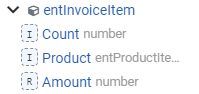
Notice that Rulecube places the
 of input in front of regular properties and the
  of rule in front of calculated properties.
Step 3: Create the Invoice entity
Create an entity named
entInvoice.Add a property named
InvoiceItemsand set its Type toarraywith Sub type =entInvoiceItem.
↳ By defining this property as an array, an invoice can have multiple items. Furthermore,entInvoiceandentInvoiceItemare connected now. And becauseentInvoiceItemis connected toentProductItem,entInvoiceis also connected toentProductItem.Add a calculated property for
TotalAmount(Type=number) and set its Expression to:javascriptInvoiceItems.sum(item => item.Amount)Explanation
This is an arrow function that summarizes all the item amounts into theTotalAmount.Save the entity.
↳ Your compound entity structure now should look like this: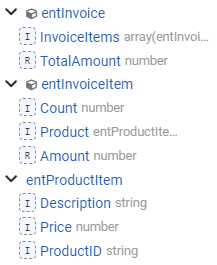
Step 4: Test your ruleset
Try out the ruleset and enter input like this:
json
{
  "Invoice": {
    "InvoiceItems": [
      {
        "Product": {
          "ProductID": "PK-207-U",
          "Description": "Rubber bands",
          "Price": 11.75
        },
        "Count": 8
      },
      {
        "Product": {
          "ProductID": "KD-883-J",
          "Description": "6mm tube - 1mtr",
          "Price": 5.15
        },
        "Count": 5
      }
    ]
  }
}
After executing, you should get a result like this:
json
{
  "InvoiceItems": [
    {
      "Product": {
        "ProductID": "PK-207-U",
        "Description": "Rubber bands",
        "Price": 11.75
      },
      "Count": 8,
      "Amount": 94
    },
    {
      "Product": {
        "ProductID": "KD-883-J",
        "Description": "6mm tube - 1mtr",
        "Price": 5.15
      },
      "Count": 5,
      "Amount": 25.75
    }
  ],
  "TotalAmount": 119.75
}
With the amount calculated per item and the total amount calculated for the invoice.
Additional resources
If you have a JSON schema or an XSD for your entity structure, Rulecube has a much easier and quicker way to create entities as described in the Drag and Drop guide.