v2.6
Invite Other Users to Rulecube
Introduction
This guide provides the steps for inviting other users to your Rulecube tenant. This enables the joint development of rulesets with your colleagues.
Before you begin
- You need to have the
TenantAdminrole to invite other users. - Determine what role(s) you want to assign to the invitee. See this authorization topic for more information about available roles.
Procedure
Click your tenant name in the menu bar.
↳ The Profile page opens with the Users section:
Click Invite user.
↳ The Invite user pop-up opens: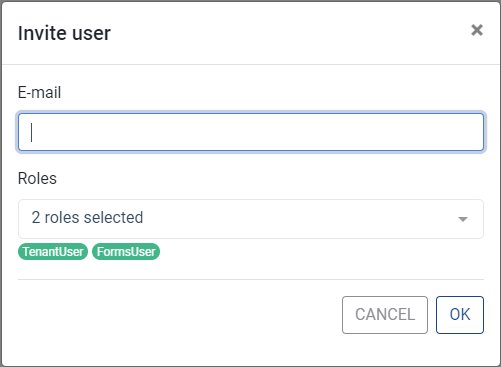
Note that the rolesTenantUserandFormsUserare pre-selected for the invitee.In the E-mail field, enter the invitee's e-mail address.
If you want to add a role, in the Roles list, select the role—the row turns green—and press
Enter.If you want to remove a role, in the Roles list, select the role—the row turns red—and press
Enter.When finished, click OK.
↳ Rulecube sends an invitation e-mail to the invitee, and a new row for the invitee is added to the Users section.Optionally, notify the invitee to activate the Rulecube account from the mail.